Dataview to Bases: Translating Your Queries
Most of a Dataview query translates mechanically. Three clauses translate cleanly but behave differently: LIMIT changes what the result count means, file.* is not restricted to markdown, and contains() is not one function.
Most of a Dataview query translates mechanically. The parts that don’t are not missing features — they’re clauses that translate cleanly and then behave differently, which is considerably worse than something that errors out.
Every Bases mapping below was run against a vault where I knew the correct answer in advance. Dataview itself was not run in this test: the Dataview column is the query as written, following Dataview’s official documentation.
This page assumes you have already decided to move a query. If you are still deciding whether to switch at all, start with Bases vs Dataview: Which Should You Use?.
The direct translations
| Dataview | Bases | Verified |
|---|---|---|
WHERE status = "done" | note.status == "done" | 201 expected, 201 returned |
FROM #memory | file.hasTag("memory") | 156 expected, 156 returned |
FROM "books" | file.inFolder("books") | 800 expected, 800 returned |
SORT rating DESC | order: [note.rating] | direction is toggled in the UI |
LIMIT 10 | limit: 10 | works, but see below |
WHERE contains(file.outlinks, [[X]]) | file.hasLink("X") | 2 expected, 2 returned |
WHERE file.mtime > date(today) - dur(7 days) | file.mtime >= now() - duration("7d") | exact to the minute |
TABLE a, b FROM … WHERE … | views: + filters: + order: |
The 156 is from a re-run with limit: 900. The first time I ran the tag view it had
limit: 20 and showed “20 results”, not 156 — the trap covered in the next section.
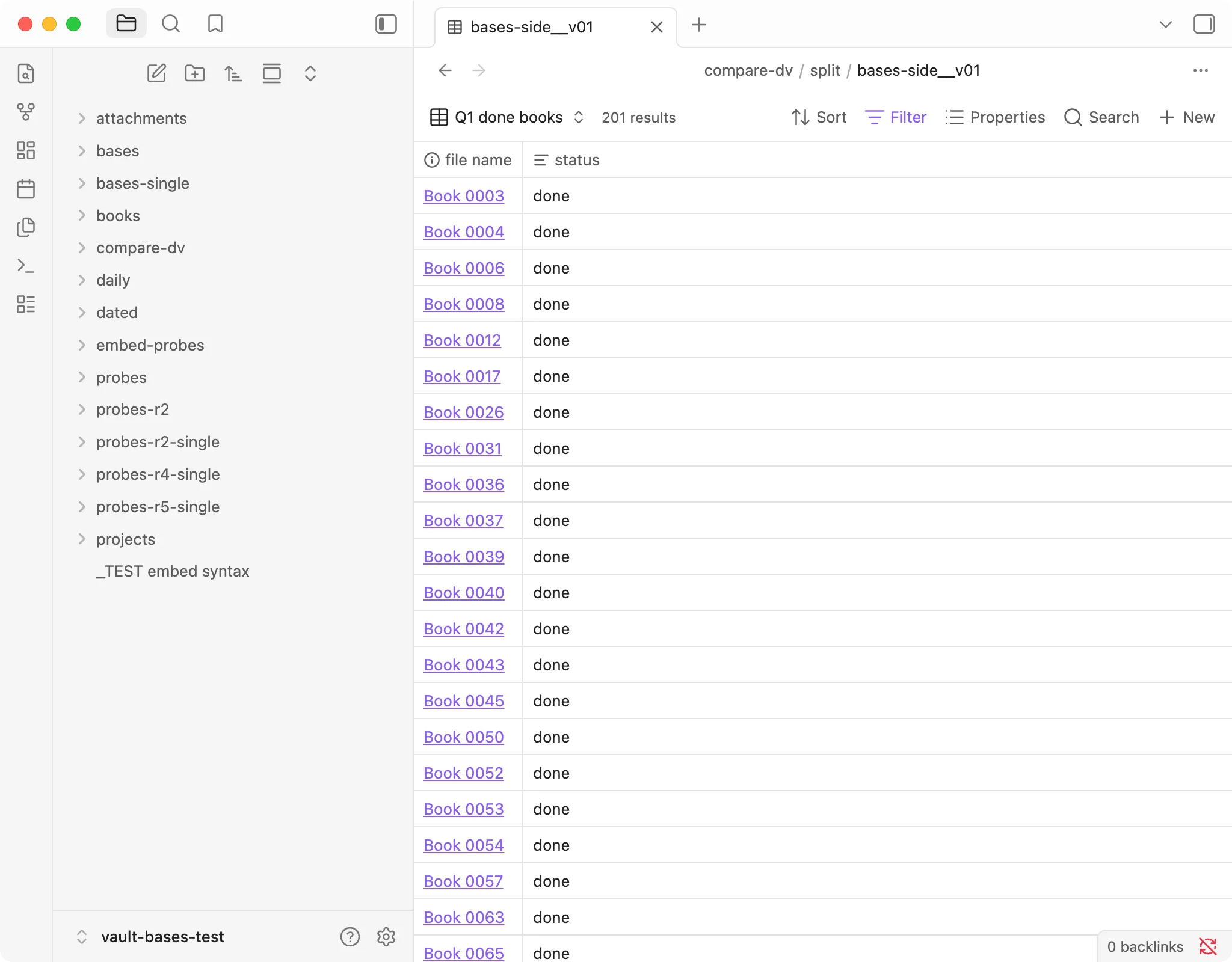
Obsidian 1.13.7, macOS, 2026-10-21. note.status == "done" inside the books folder: 201 results, matching the
201 counted in Python.
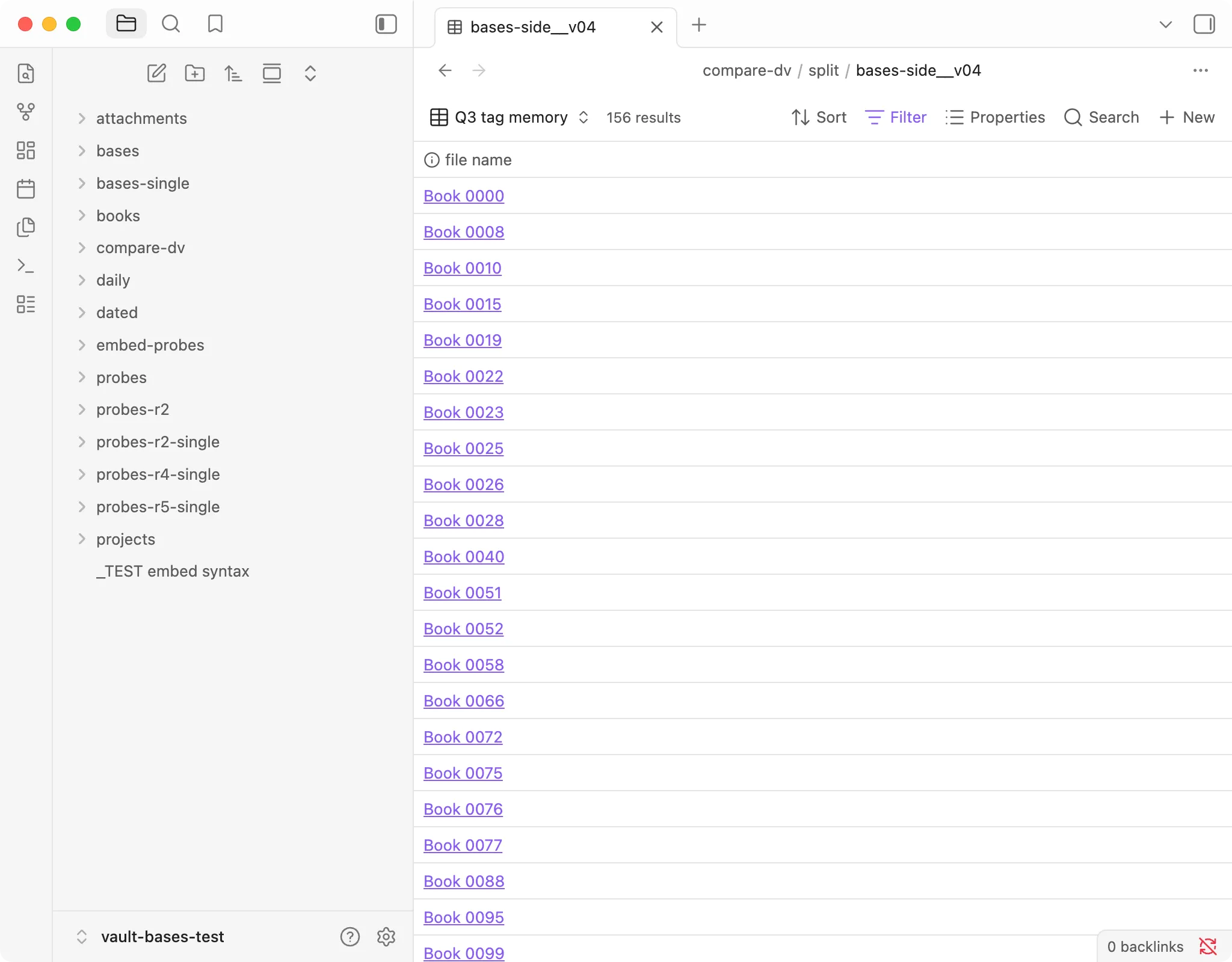
Obsidian 1.13.7, macOS, 2026-10-21. file.hasTag("memory") with limit: 900: 156 results, matching the 156
counted in Python (nested and inline tags included, tags inside code blocks not).
Note the double equals. Dataview’s WHERE status = "done" uses one (its own docs
write WHERE status = "open", Structure of a Query); Bases needs
==. This is the single most common thing to trip on in the first hour, because
single-= is muscle memory from Dataview’s SQL-ish grammar.
The three that translate cleanly and behave differently
1. LIMIT changes what the result count means
In Bases, each view prints a result
count next to its name — and that count is rows displayed after limit, not rows
matched.
Three of my views, with their true match counts. All three views sit inside a base already scoped to books/ with
status != "abandoned", so the counts are within that scope.
| Filter | Actual | Displayed | limit |
|---|---|---|---|
| price and pages conditions | 146 | 25 results | 25 |
| status or rating | 343 | 25 results | 25 |
not hasTag(...) | 466 | 25 results | 25 |
Three filters whose answers differ by more than 3×, all reporting the same number. No truncation indicator anywhere. (The same three views, with the filters written out, are on the filter syntax page.)
When migrating, raise every limit above your expected total until you have
confirmed the query is right. Then lower it for display.
2. file.* is not restricted to markdown
In Bases, file.mtime, file.ext and
friends apply to every file in the vault — PDFs, images, CSVs, and the .base
files themselves.
A recently-modified filter meant for notes should have matched 1,476 markdown files (1,616 notes in the vault, minus the 140 older than seven days, counted in Python). Bases returned 1,641, because 165 non-markdown files matched too. Nothing errors; the number is just quietly too big.
filters:
  and:
    - 'file.ext == "md"'        # add this
    - 'file.mtime >= now() - duration("7d")'
3. contains() is not one function
It is easy to read contains() as one “does this include that” check. In Bases it
is three different operations:
- on a text property → substring match, case-insensitive
- on a list property → whole-element equality, case-insensitive —
fictiondoes not matchnonfiction - on a number property → throws an error
(Every case, with the probe notes, is in Obsidian Bases contains(): 3 Behaviours, Tested.)
The list behaviour is the one that surprises people, and it surprises them in the safe direction, so it tends to go unnoticed until they apply the same assumption to a text property, where substring matching is real.
Two more consequences for migrating:
lower(x).contains(...)is now redundant.contains()already ignores case. I confirmed this by running the same filter with"Murakami"and"murakami"and getting the identical row set, not merely the same count.WHERE contains(tags, "x")should becomefile.hasTag("x"), notnote.tags.contains("x"). They are not equivalent.hasTag()reads Obsidian’s trimmed tag cache;tags.contains()reads the raw frontmatter. A tag written as" fiction"with a leading space is matched by the first and missed by the second.
What I have not verified
I am not going to translate clauses I haven’t run.
GROUP BY — works, but only in one spelling, and two of the wrong spellings fail
silently or loudly depending on which mistake you make. The form that works in 1.13.7 is
a mapping under the view:
views:
  - type: table
    name: By status
    groupBy:
      property: status
      direction: ASC
The table splits into sections with a header like status abandoned; direction: DESC
reversed the order (to-read first). Writing note.status also works — and when
Obsidian saved the file it rewrote it to plain status, so that is the form it prefers.
What didn’t work: groupBy: note.status as a plain string and groupBy as a list both
stop the base with "groupBy" must be a object; group_by with an underscore raises no
error at all and simply leaves the table ungrouped. In my screenshots the group header
showed the value but no per-group count, so if you relied on length(rows) in Dataview,
I haven’t found the equivalent yet.
FLATTEN — not tested in this round. Dataview’s docs describe it as “one result
row per entry in the array” (Data Commands); I have no
Bases evidence either way and won’t guess.
DataviewJS — out of scope by construction. Bases is declarative YAML; there is no JavaScript execution surface. If your vault depends on DataviewJS, that is not a migration, it’s a rewrite, and this page can’t help you scope it.
A migration order that works
- Start with the control query. Translate your broadest query first — a folder or tag with no other conditions — and check the count against something you know. Get one number right before trusting any others.
- Raise every
limit. Until the query is verified, the displayed count has to mean matches. - Add
file.ext == "md"to anything usingfile.*properties. - Replace
contains()on tags withhasTag(). - Then translate the narrow queries, one at a time, checking each against its Dataview original while both still exist.
Step 1 sounds like overhead and is the step that saves the day. Zero rows in Bases looks identical whether your syntax is wrong, your folder path is wrong, or your filter is asking for a value that isn’t in your vault. I lost real time in this test series to a filter looking for a tag that did not exist anywhere — every view returned zero and I very nearly concluded the feature was broken.
One thing that just works
Nesting. I tested and / or / not interleaved to six levels, computing each
expected count separately, and every one matched exactly. not wrapping a compound
block negates the whole block, as it should.
If you have complex Dataview WHERE clauses with layered boolean logic, that part of
the migration is safe. The per-level counts are in
Obsidian Bases Nested Filters: 6 Levels, Tested.
Tested on the version in the box at the top of this page. The Bases results are measured; the Dataview side comes from Dataview’s official documentation (checked 2026-10-20). Verify against your own install before relying on the specifics.