Embedding an Obsidian Base in a Note: 11 Syntaxes Tested
There are more ways to write an embed than there are ways for it to work. I put eleven of them in eleven separate notes, pointed all of them at the same base, and opened each one.
The base has two views: Currently reading and Long ones. Having two matters —
it’s how you can tell “the embed picked a view” apart from “the embed ignored you.”
The file is really called 03-embed-target.base; in the table below I shorten it to
target.base to keep the rows readable.
The results
| # | Syntax | Renders? | What you get |
|---|---|---|---|
| A | ![[target.base]] | Yes | The first view, with the full toolbar |
| B | ![[target.base#Currently reading]] | Yes | That view specifically |
| C | ![[target.base#Long ones]] | Yes | The second view, correctly filtered |
| D | ![[target.base#Longones]] | No | Explicit error naming the missing view |
| E | ![[bases/target.base]] | Yes | Identical to A |
| F | ![[target]] — no extension | No | Treated as a link to a note that doesn’t exist |
| G | [[target.base]] — no ! | n/a | A plain link. Correct Markdown behaviour. |
| H | ```base code fence | Yes | Renders inline, no .base file needed |
| I | ```bases code fence | No | A grey code block. No error. |
| J |  | Yes | Identical to A |
| K | A base that doesn’t exist | No | Broken-link placeholder — this is the control |
K is the control group and it matters. It confirms that when something didn’t render, it genuinely didn’t render — the embedding mechanism itself was working the whole time. Without it, every failure above would be ambiguous.
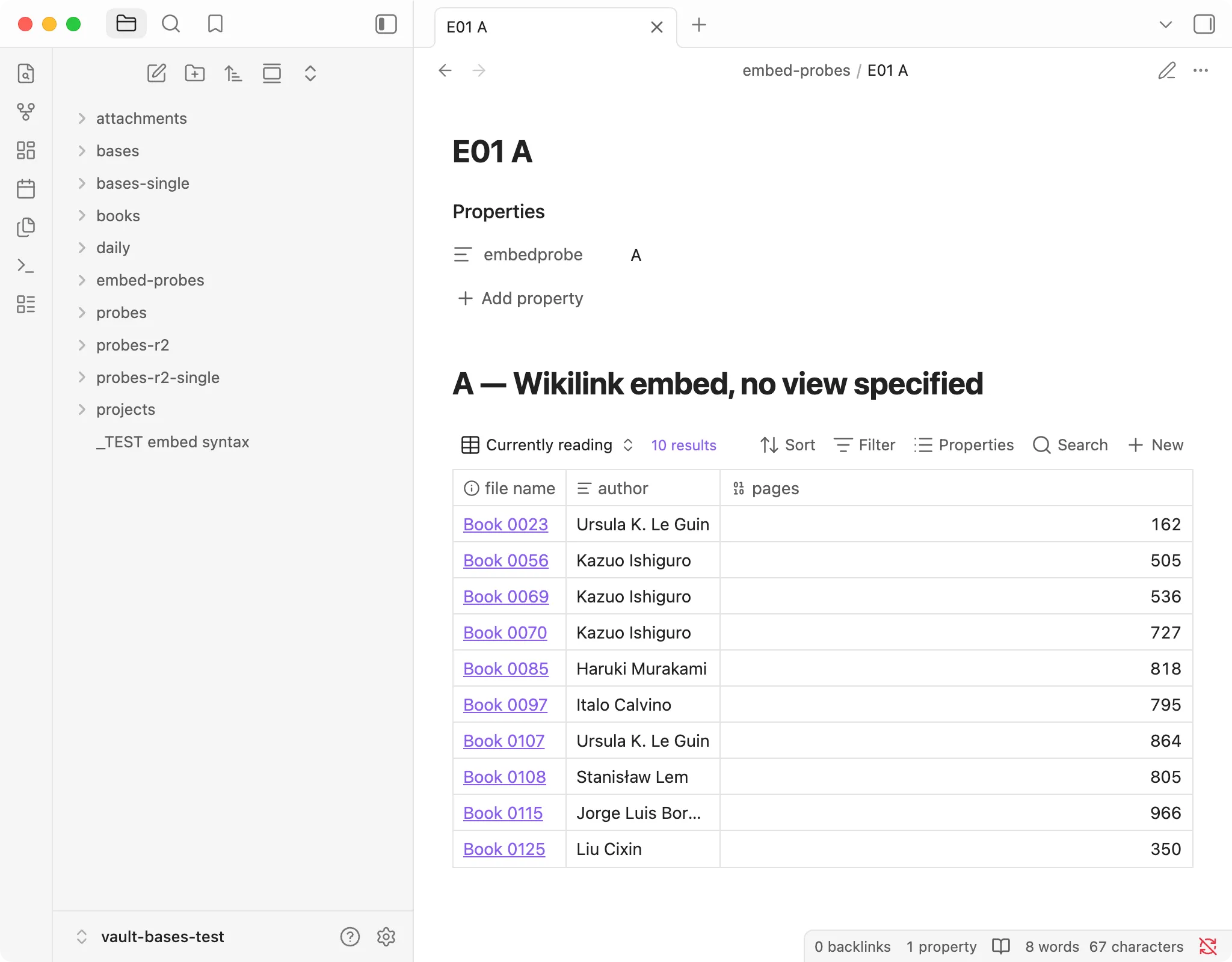
Case A, ![[target.base]] with no view named. You get the first view in the file, with the full toolbar. “10 results” is the view’s limit, not the match count, which is 37. More on that below.
The extension is mandatory, and this is the one that gets everyone
Everywhere else in Obsidian, ![[My Note]] works fine without .md. Here it does
not. ![[target]] produces a “create this note” placeholder, because Obsidian looked
for a note called target, found nothing, and offered to make one.
My test file was called 03-embed-target.base. Leaving off the extension got me this:
“03-embed-target” is not created yet. Click to create.
The failure is visible, at least. It just doesn’t look like an embed problem — it looks like a typo in a note name, which sends you off checking the wrong thing.
Always write .base.
View names must match exactly, spaces and all
#Long ones works. #Longones doesn’t, and says so:
View “Longones” not found
It shows up in orange inside the embed. The toolbar is still there, but the view icon turns into a question mark, Filter and Properties are greyed out, and it says 0 results.
That’s a good error. It names the view it couldn’t find, so you know immediately that the file resolved and only the fragment was wrong.
The silent one: base versus bases
You can embed a base inline, with no separate .base file, using a code fence:
```base
filters:
  and:
    - file.hasTag("systems")
views:
  - type: table
    name: "Inline"
    filters:
      'note.status == "reading"'
    order: [file.name, note.status]
    limit: 5
```
That renders a real, working table.
Write ```bases instead — one extra letter, and the more natural plural, matching
the name of the feature — and you get a grey code block containing your own YAML.
No error. No warning. No hint.
This is the worst failure mode in the whole set, and it’s worth being precise about why. A visible error tells you where to look. A grey box containing YAML looks enough like something rendered that your next twenty minutes go into the filter. The filter is fine. The word is wrong.
I did not find any way to make it announce itself.
The fence is base, singular. The feature is called Bases. The fence is not.
Three syntaxes are interchangeable
![[target.base]], ![[bases/target.base]], and  produced
identical output. Use whichever your muscle memory prefers; the path form is worth
knowing if you have two bases with the same filename in different folders.
The row count in an embed is not the match count
The embedded Currently reading view displays “10 results”.
It matches 37 notes. The view has limit: 10.
I counted the 37 separately, in Python, against the files on disk. There is nothing in the embedded view indicating truncation — no ellipsis, no “10 of 37”.
If you embed a base in a dashboard note to keep an eye on a count, the number you
are watching is your own limit, not your data. Remove the limit, or stop treating
that number as information.
Reading view and Live Preview agree
All eleven syntaxes behaved identically in both modes. The embedded tables remain interactive in reading view — you can still sort and filter them there. No separate testing needed.
One thing I got wrong, which turned into a finding
My inline base fence returned zero rows on the first attempt. I very nearly wrote
that inline fences don’t support filters.
The filter said note.status == "read". The actual values in my vault are
reading, done, to-read, and abandoned. There is no read.
Changed it to "reading" and got five rows immediately. So: == is strict
equality with no prefix matching — "read" does not match "reading". That’s
obvious written down, and it was not obvious at all while staring at an empty table
that I was convinced was a rendering bug.
Zero rows is never evidence of anything on its own. That’s what K is for.
The short version
- Write
.base. The extension is not optional here, unlike everywhere else. - Write the view name exactly, spaces included. Wrong names produce a clear error.
- The code fence is
```base. Plural fails silently, which is the only failure here you can’t see. - The displayed result count is your
limit, not your matches.
Tested on the version in the box at the top of this page. Verify against your own install before relying on the specifics.